How to Register for GTC Summer Camps
Step 1 – PARENTS/GUARDIANS Create a registration profile
- Visit https://gvltec.augusoft.net/
- Select Login/Create Account
 Select Create a New Profile
- Under Select Profile Type, choose Household.
- Complete all required fields and select Continue.
- On the next tab, complete required fields and select Submit.
Be sure to save your information – you’ll need to log back in to register.
Step 2 – Add camper to household profile
- From the Main Menu on the left side, click My Profile.

- Click the option to Add youth member to household.
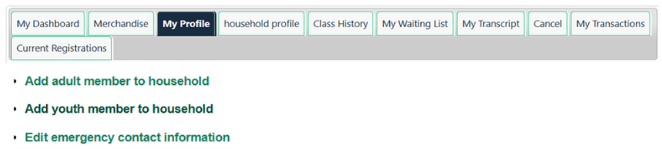
- Complete all required fields for your camper and Save Profile
Step 3 – Pre Register
PRE-REGISTRATION ELECTRONICALLY OR IN-PERSON IS REQUIRED
Complete all the following (as applicable):
- Camper Form, Health and Emergency Contacts - complete and submit online
- Adventure Tech - Internet Use and Photography/Media Release Form - complete and submit online
- Optional if Applies: Completed Adventure Tech - Epi-Pen Inhaler Authorization Form - if applicable, complete and submit online
Step 4 – Register for Camp
- Return to https://gvltec.augusoft.net/ and log in.
- Under the BROWSE menu, click on Youth Programming. Find the camp(s) you want and select Begin Registration.
- When the Assign Member Class pop-up appears, select the student's name to register.
- On the Prerequisites page, please upload one document with scans of your Real ID and your child's passport or birth certificate. If additional documents are required, please email them to ce@gvltec.edu. Click SAVE.
Our registration team will review your Legal Presence upload, as required by the State of South Carolina. Once approved, you will receive an email that you are ready to finish registration.
- After approval is received, sign in to your account again to finalize and submit payment.
For assistance, please call 864-250-8800.